Using port 443/tcp for Remote Relay
Evolution's Remote Relay service — by which customers in the field access the Evolution service bureau's system — listens on ports 9901..9903/tcp, with a default of 9901. All go to the same place, but differ in the amount of compression applied to the stream.
This variable compression is a throwback to the older days of slower internet speeds: you'd probably want more compression to reduce the data sent over on slow dialup connection. These days with monstrous cable speeds the distinction is not really that important any more, but all three are still open as a kind of legacy.
These are open for all Evo installations supporting Remote Relay, but an increasing number of payroll customers are performing egress filtering in their border firewalls, which blocks outbound traffic to unknown ports, and these customers have traditionally had to create manual exceptions in the firewall to allow connections to the Evo servers.
Some customers have a harder time making these exceptions, because perhaps the firewall committee meets only once a week (really!), and since exceptions are often based on IP address rather than hostname, these whitelists have to be updated when the payroll service bureau changes internet providers.
One payroll customer's firewall was centrally managed from corporate headquarters, and the end user said it would likely take months to get this change implemented. Ouch.
Remote Relay supports listening on an additional TCP port, and for years I've been configuring service bureau systems to use 443/tcp, the same port used by secure web (https), because even customers with aggressive egress filtering typically allow outbound https, meaning the connection to the Evo server works too. It's been very helpful.
This requires one-time implementation on the service bureau side in Evolution and in the border firewall:
- In the payroll service bureau's border firewall, look for the rules related to the inbound Remote Relay public IP address (where 9901..9903, and sometimes 9943/tcp are handled), and forward 443/tcp to the same place. But: see caveat below.
- In the Evo Management Console, navigate to Configuration ⇒ RR Ports, then enter 443 in the "Custom" field. I typically select merely "Good" compression, believing there being no good reason to burn local CPU resources to save bytes on a fast connection.
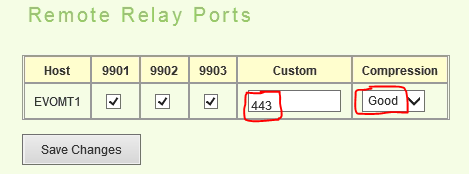 Save the changes.
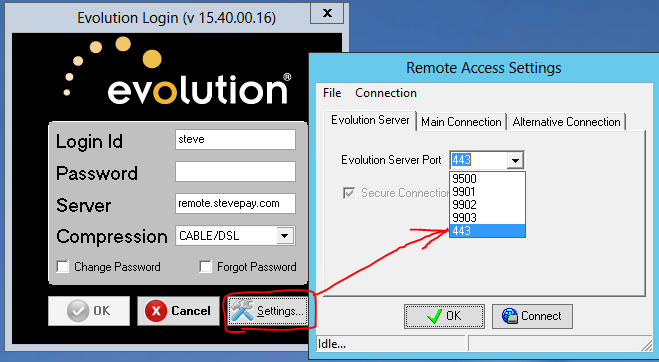
 - Ask an Evo Remote customer test the connection by launching the Evo client, clicking the Settings button, then choosing 443 from the drop-down box.
Caveat: this can only be configured by the service bureau if the public IP address listening on 9901..9903/tcp has 443 open in the first place. Those with a single IP address on their internet connection might already be using 443/tcp on the same IP for something else (perhaps webmail or Remote Web Workplace). In this case, it's likely not possible to use this facility.
Once configured, Evo Remote customers having problems connecting on the default ports ought to be invited to change to 443/tcp to see if that works. But once customers are connected to Evo Remote — by whatever port — there's no good reason to change them.