FortiClient SSL VPN - connecting before login
A pox on Fortinet for a lousy user interface and hours of wasted time.
When using the SSL VPN to connect a remote system to the main office — which works pretty well — Windows domain credentials are usually cached, so even without a network connection you can login to the computer. This is why even on a corporate domain-joined laptop you can login with your domain credentials but no network connection.
This also works in the VPN scenario: login with cached credentials (no network connection required), and once in you can launch the SSL VPN to connect to the domain controllers. Works fine.
But what happens when a new user takes over a desktop at the remote office? There are no credentials cached, so no login can happen without a connection to the domain controller, but without launching the FortiClient, no connection comes up. A classic chicken-and-egg problem.
The Fortinet knowledge base articles helpfully describe a "Enable VPN before login" option that seems to do exactly what we want, right under File→Settings
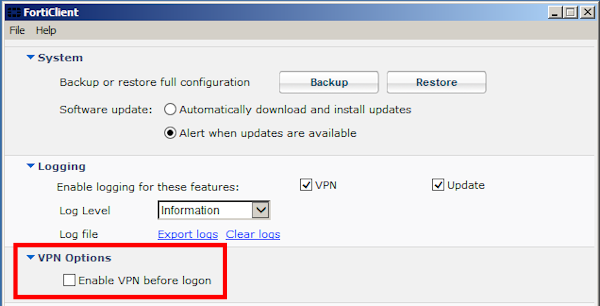
Just what I wanted - sign me up!
Wait: where do I click?
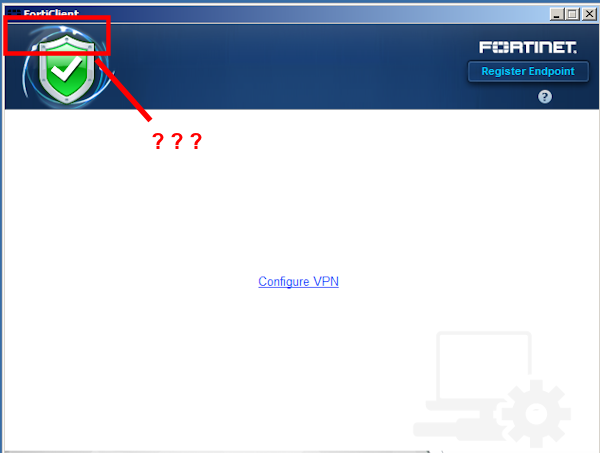
Really - it's not there, there's nothing to click, nothing to find, no obvious way to get to the File menu to get to settings,
Uninstalled and reinstalled many times, rebooted many times, tried installing the full package and not just VPN only, tried setting the "fortissl" network connection object as the default connection. Tried an older build of the FortiClient software.
None of this made any difference. Is it a licensing thing? Am I just stupid?
The problem is that I had to launch the FortiClient console as the administrator to get the menus, something that's not documented in the knowledge base, and absolutely not obvious from the client itself.
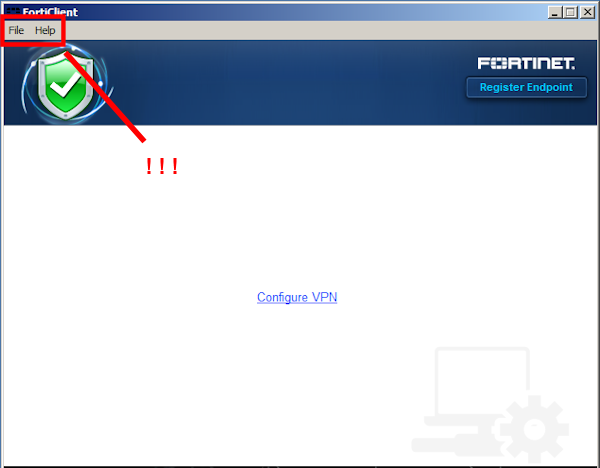
This is a terrible, terrible user experience.
When running as a non-admin user, I can fully manage VPN connections: define new ones, delete old ones, change configurations, and connect/disconnect to any of them. To me this smells vaguely admin-y, and because it's not asking me for elevation to do any of it, it is not obvious that I'd need to elevate to make additional items appear in the UI.
I do understand that the setting itself requires elevation, because this impacts the state of the machine beyond the current user, but that there is no clue whatsoever in the UI that something is missing, and could be enabled by elevation. What the hell kind of UI is this?
If It were me, I'd probably do something like adding the File: menu but graying it out, so it's obvious there's a "there" there, and — perhaps — an option in settings "Hide File menu for non-admin users". But make the default to expose the options to the user.
At minimum this has to be noted in the Fortinet KB article on the subject; I've created some feedback for them in the hopes that they fix this.
Fortinet: thanks for nothing.