Floating-point Division by Zero when printing checks
A customer receive a floating-point division by zero error when printing checks, with this exception message showing the important parts (this error occurred on the Evo middle tier).
Check Letter Bottom Stub (New) (S1750): Floating point division by zero
...
operating system  : Windows 2003 Service Pack 2 build 3790
...
executable        : isRWEngine.exe
...
exception message : Floating point division by zero.

main thread ($2f0):
5b1344fe icm32.dll
5b13160a icm32.dll       CMCreateProfileW
73aa5129 mscms.dll       CreateProfileFromLogColorSpaceW
77c20803 GDI32.dll       CreateDIBSection
...
The issue was related to the signature bitmap file: something about it was not compatible with the graphics libraries found on Server 2003, and re-saving the file in a different format worked around the issue.
Server 2003 is quite old, and is only barely within Microsoft's support window, and it shares graphics libraries with XP (which is not supported at all), and some bitmap file formats are simply not supported on these older operating systems.
To clean up their scanned signature files, the customer uses GIMP (think of it as an open-source Photoshop), and they had been using an older version on XP that didn't know about these newer image options, so they were able to produce checks without incident for many years.
But upgrading their workstations to Windows 7 with the latest version of GIMP introduced all these newer image formats that confused Server 2003, causing checks to fail.
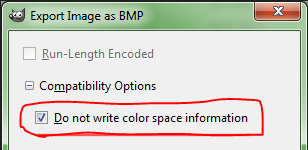
The fix: when saving the file ("Export Image as BMP"), look at the Compatibility Options and enable [X] Do not write color space information; this turns off the part of the image that causes the error.
GIMP does not appear to support saving in 8-bit format (256 colors), so it's probably best to use 24-bit color. More technical information can be found in this Stack Exchange post.
Alternately, one could probably open this file in MS Paint and just save it again but in a reduced color depth (such as 8-bit / 256 colors) and then importing the signature file into Evolution. This has the benefit of making the file smaller too.
Tip: when troubleshooting this issue, open Evolution.exe on the Server 2003 machine in question: if you can load/view the image from the Evo client on that machine, the image will print fine on that machine.
NOTE 1; this only impacts service bureaus with Server 2003 on the middle tier; those with newer operating systems won't run into this.
NOTE 2; this is not a bug in Evolution; they quite reasonably rely on the underlying operating system for graphics handling, and there's little they could (or should) do to ameliorate this issue.
A tip o' the tech hat to iSystems developer Oleg for pointing us in this direction.