Evo Client use inside the service bureau
This post applies only to service bureaus who host their own Evolution servers; it specifically does not apply to those on the HSP.
Evolution provides the Remote Relay service to allow secure remote access for payroll customers on the outside, but Remote Relay should not be used by staff inside the service bureau and on the local network. Instead, the client should be configured to go directly to the Request Broker: this is a common mistake even though it appears to work.
Because the Evo Client installer defaults to the most common case — customers on the outside — all service-bureau staff has to perform a one-time port configuration to change these settings.
- Launch the Evolution client
- Use the drop-down box to select Compression=None
- Click Settings
- Use the drop-down box to select Port=9500
- UN-check the "Secure" box
- Click OK to dismiss the settings box
- Enter your Evo username and password
- Click OK to login to Evolution
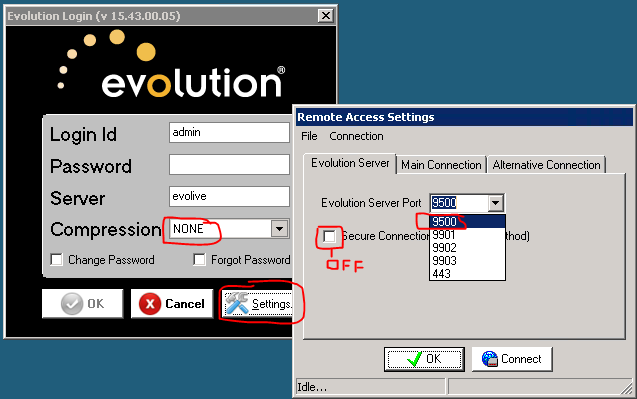
It's possible that you'll have to go through this twice if Evo has to auto-update itself, but once you're fully logged in, Evo will remember all these settings for the user.
How to check
Rather than visit every user's workstation, IT staff can recognize internal users using Remote Relay from the Evo Mgmt Console. Navigate to Monitoring ⇒ RR Status, and this shows all users connected by Remote Relay.
By looking in the IPAddress column for addresses on the local network (often in the form 10.X.X.X or 192.168.X.X), one can identify local users and ask them to log out of Evolution, then log back in using the proper port settings.
This RR Status page only reflects current users, not those who've been on in the past, so IT staff may wish to visit this page now and then to check for stragglers.
Why does it matter?
It's possible for payroll staff to use Remote Relay successfully — the HSP is based on this — but there are several reasons why it's better for all staff to go directly to the Request Broker.
- Going through Remote Relay adds an additional compression and encryption stage in the process, but without providing any additional security. On modern systems the crypto step is not all that costly, but it's extra work for the Evo systems that shouldn't be necessary.
- Going through Remote Relay adds an additional batch/post step to some Evo screens, and going directly to the Request Broker removes this step. It's faster.
- Occasionally it's necessary to exclude remote customers from the Evo system while allowing payroll staff to remain connected; this doesn't come up often, but when it does, being able to turn off Remote Relay is very helpful.
- Service bureaus are increasingly requiring all SB-type access to Evolution be performed from inside the company offices and disallowing it over Remote Relay. This security measure insures that service bureau credentials cannot be used outside the office.
This is not an "IT" issue
I strongly recommend that this port configuration be done directly by the payroll service staff member because this creates a familiarity that will allow them to help customers going through it.
Of course, remote customers will never be going directly to the Request Broker, but it's common enough to walk customers through changing ports around (such as using port 443/tcp that it benefits the customer when the SB staff actually knows the material rather than reading from a script.
And to the extent that security policies allow, I recommend having payroll staff install the Evo client on their own workstation for the same reason.
Offloading all of these issues to the IT staff means payroll customers get less responsive service to their remote connection issues.