"Cannot initialize Report Writer" failures
There's a category of error that shows up when running reports, and it's unfortunate that the message doesn't really give an indication of what the real problem is. The error looks like:
Cannot initialize Report Writer
Communication file "D:\EvoTEMP\EvRequestBroker\EAADD5AA40AC45449023D156149584AD.tmp" is missing
The missing file is merely a symptom of the real problem, which we have to dig for, but first some background on the process:
When Evolution runs a report from the middle tier, the Request Broker or Request Processor hands the job off to the report writer components (isRWEngine.exe, usually) to do the heavy lifting, and it's during this handoff that the error occurs.
- The RB or RP creates a temporary filename such as D:\EvoTEMP\EvRequestBroker\EAADD5AA40AC45449023D156149584AD.tmp but does not create that file: it's just a name of a communications file that might exist in the future. This is an important point.
- The RB or RP launches isRWEngine.exe to do the work, passing that communications filename on the command line.
- The RB or RP pauses to wait for that file to appear on the disk.
- The report writer engine creates some network ports in order to communicate with the RB or RP.
- The RW engine writes those port numbers to the filename provided by the caller: this file did not exist prior to this action!
- The RB/RP notices that the file was created - Aha! - opens the file, reads the port numbers, and connects to the RW engine over those network ports.
- The RB and RW components exchange information and cooperate to run the report.
- Having established their connection, that temporary communications file is deleted from the disk.
This handshake is typically quite brief - just a second or so - but the RB or RP won't sit around forever for that file to appear. If it doesn't show up in a short time - perhaps 60 seconds? - it assumes that the RW engine failed for some reason and logs an error about the communications file being missing.
That's what you see in the logs, but it doesn't show what the real problem is, which is: why did the RW engine fail? That's what we have to look into.
Digging in
Fortunately, the actual failure reason is logged somewhere, though it's not available form within Evolution or from the Evo Management Console: instead, you have to go onto the server and find it manually.
The first step is always to determine which server the error occurred on, and this is found in the stack trace associated with the error.
Cannot initialize Report Writer
Communication file "D:\EvoTEMP\EvRequestBroker\EAADD5AA40AC45449023D156149584AD.tmp" is missing
date/time         : 2014-09-11, 11:10:36, 556ms
computer name     : EVO2 ----- middle tier with the failure
user name         : SYSTEM
...
executable        : EvRequestBroker.exe
exception message : Cannot initialize Report Writer Communication file "D:\EvoTEMP\EvRequestBroker\***.tmp" is missing.
Here, we see on the line "computer name" that the error happened on EVO2: that's where we have to look.
Logging onto the server's desktop, either on the console directly or via Remote Desktop, use the normal file manager to navigate to the directory containing the Evo middle tier, which is usually one of:
- C:\Program Files (x86)\Evolution\DeploymentManager\Applications\Evolution\
- C:\Program Files\Evolution\DeploymentManager\Applications\Evolution\
Once here, we're going to use the iSystems log-viewer application to search for where this error occurred. Double-click on the isLogViewer.exe, then from the top menu select File:Open.
There are two logfiles associated with a failed RW operation: isRWEngine.log and isRWPreview.log, and they must be checked separately. I usually start with RWEngine, but RWPreview has also been implicated.
We're looking for errors that correspond with the ones we got before, and fatal errors are shown in red: these are the promising ones.
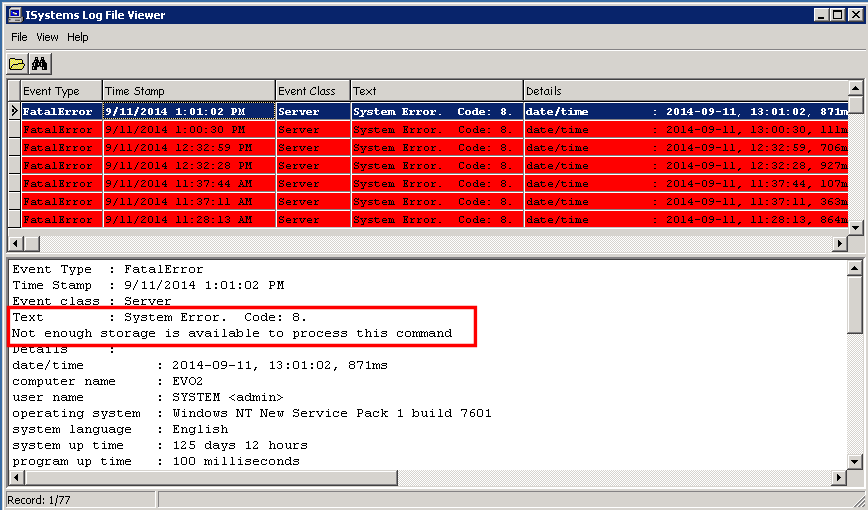
Here we see the real error (highlighted in a red box), and there are a number of failures possible.
System Error. Code: 8. Not enough storage is available to process this commandThis error message is unfortunately not obvious, but error#8 when trying to create a window — as shown from the stack trace found in the long error message — this can only be fixed by rebooting the entire server (restarting Evo services won't do it).
main thread ($15dc):
0045c4d5 isRWPreview.exe SysUtils   RaiseLastOSError
004c152c isRWPreview.exe Controls   TWinControl.CreateWnd
004d7669 isRWPreview.exe Forms      TScrollingWinControl.CreateWnd
...
There are a number of things that can cause a low-level failure like this, such as running out of desktop heap, but in practice this is caused by a bug in the underlying Delphi window library that exhausts what's known as the "atom table". Once this runs out, only a reboot can fix it.
As I run across other failure modes — which can be caused by local firewalls — I'll extend the list above.