Aligning objects with angled lines
I was creating another one of my Tech Tips (so far unfinished), and one of the illustrations required that an object be aligned along a diagonal line. Though AI has a tool for doing text along a path, I don't know if there's a more general mechanism for other things (say, a bunch of objects as a group).
But I want the angle to be perfect: doing it by hand is not accurate enough. So I reverted to my inner math geek and derived the way to calculate the it.
The line itself was drawn based on the underlying display grid - 4 units high, and 36 units wide - and this was mainly an aesthetic choice (yes, I could have rotated a straight line by a fixed angle, making it easy to rotate the other object the same degree).
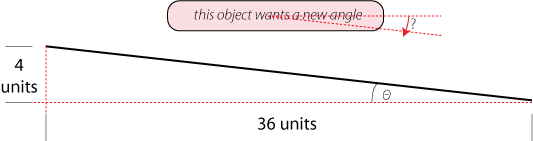
The angle we want is θ, and remembering SOH-CAH-TOA from middle-school trigonometry, the Tangent of θ is Opposite over Adjacent:
          4    (opposite)
tan(θ) = ---
         36    (adjacent)
Hmmm, so the tangent of θ is 0.1111, but what's θ itself? Solving for θ means we compute the arctangent of 0.1111. All scientific calculators have this function, including the Windows calculator (found in Accessories) by selecting View:Scientific from the top menu.
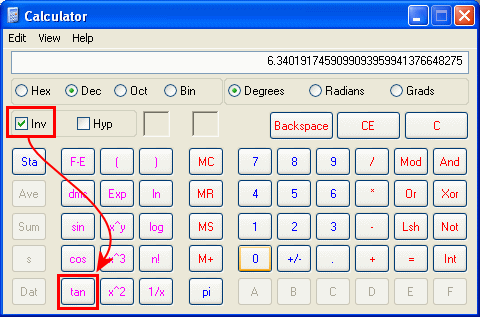
This gives us:
arctan(0.1111) = 6.3402 degrees
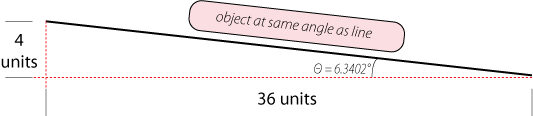
Using AI's rotation tool, we rotate the rounded rectangle by 6.3402° to get a perfect match between the two objects.
This can be generally described by finding the angle based on any two sides of a right triangle
θ = arctan(OPP/ADJ)
θ = arcsin(OPP/HYP)
θ = arccos(ADJ/HYP)
Math is fun
